 0498 70 98 60
SPF, DKIM, DMARC: How to Set Up Email Authentication in 2026
Updated October 31, 2026
If your newsletters, invoices, or sales emails have started landing in spam or bouncing back with cryptic error codes, email authentication is the first place to look. Since 2024, Gmail and Yahoo have required bulk senders to authenticate their mail, Microsoft followed for Outlook.com in May 2025, and Google ramped up enforcement in November 2025 by rejecting more noncompliant messages. SPF, DKIM, and DMARC are no longer optional technical extras. They’re the entry ticket to the inbox.
This guide explains what each standard does in plain terms, what the major mailbox providers require, and how to roll out SPF, DKIM, and DMARC, in that order, without breaking legitimate email along the way.
Why Email Authentication Matters Now
Email was designed without a way to prove who sent a message. That’s why criminals can send phishing emails that appear to come from your domain, and why mailbox providers are suspicious of mail they can’t verify. Authentication solves both problems:
- It tells Gmail, Yahoo, Microsoft, and other providers that a message really comes from a server you authorized.
- It lets you instruct those providers to reject mail that pretends to be from you, protecting your customers and your brand.
- It builds a sending reputation tied to your domain, which affects whether your future emails reach the inbox.
A domain that’s being spoofed or used to send spam can end up on blocklists. If you run WordPress, a compromised site can also send spam from your server; our article on a WordPress site sending spam covers that scenario.
SPF, DKIM, and DMARC in Plain English
| Standard | What it does | Where it lives |
|---|---|---|
| — | — | — |
| SPF (Sender Policy Framework) | Lists the servers and services allowed to send email for your domain | A TXT record in your domain’s DNS |
| DKIM (DomainKeys Identified Mail) | Adds a cryptographic signature to each message so the receiver can verify it wasn’t altered and was authorized by the domain | A public key published in DNS; the private key stays with the sending service |
| DMARC (Domain-based Message Authentication, Reporting, and Conformance) | Tells receivers what to do when a message fails SPF and DKIM alignment, and sends you reports | A TXT record at _dmarc.yourdomain.com |
Alignment is the concept that ties them together. DMARC passes only if SPF or DKIM passes and the domain they authenticate matches the domain in the visible From address. A message can pass SPF for your email platform’s domain and still fail DMARC if the From address shows your domain and nothing aligns.
What Gmail, Yahoo, and Microsoft Require
Gmail and Yahoo introduced their requirements in February 2024. For all senders to personal Gmail accounts, messages need to pass SPF or DKIM, come from servers with valid forward and reverse DNS, and use TLS. Bulk senders, which Google defines as anyone sending close to 5,000 messages or more per day to personal Gmail accounts, must also:
- Authenticate with both SPF and DKIM.
- Publish a DMARC record, at least p=none, with the From domain aligned with SPF or DKIM.
- Offer one-click unsubscribe in marketing and subscribed messages, with a visible unsubscribe link, and honor requests within two days.
- Keep spam complaint rates low. Google recommends staying below 0.10% and never reaching 0.30%, as measured in Postmaster Tools.
Once a domain is classified as a bulk sender, Google says that status doesn’t expire. In November 2025, Gmail stepped up enforcement, and noncompliant traffic can now face temporary or permanent rejection rather than just spam placement.
Microsoft applied similar rules on May 5, 2025, for domains that send over 5,000 messages per day to Outlook.com, Hotmail.com, and Live.com addresses: SPF must pass, DKIM must pass, and DMARC must be published at least at p=none and aligned. Microsoft changed its plan shortly before enforcement: noncompliant messages are rejected with an error, instead of being routed to junk.
Even if you send far less than 5,000 messages a day, follow the bulk sender rules anyway. They’re best practice, and smaller senders still get filtered when their mail looks unauthenticated.
Step-by-Step: Setting Up SPF, DKIM, and DMARC
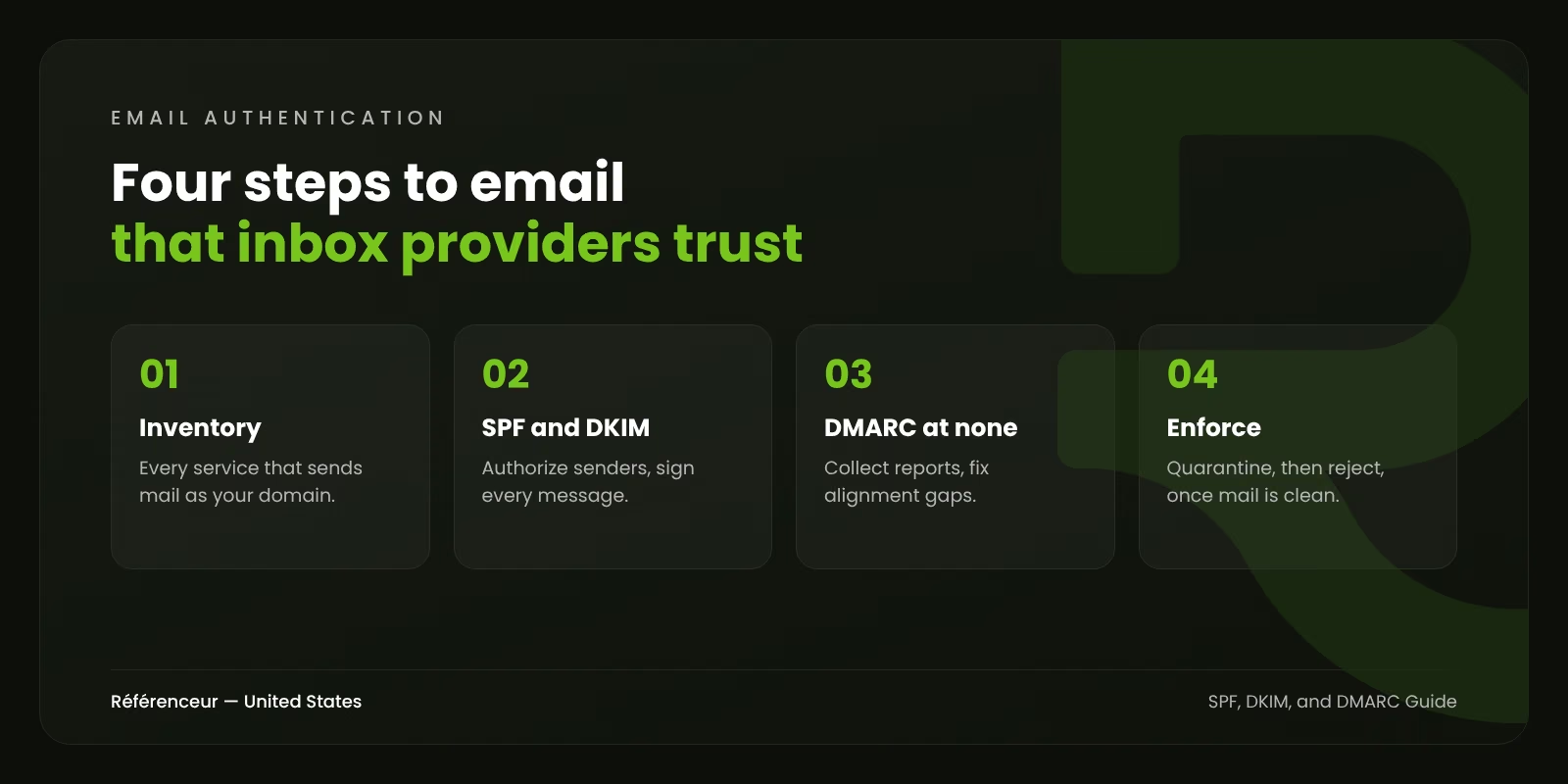
Step 1: Inventory Every Service That Sends Email as Your Domain
This is the step people skip, and it’s why DMARC rollouts break things. List every system that sends mail with your domain in the From address: your mailbox provider (Google Workspace or Microsoft 365), email marketing platform, CRM such as HubSpot, helpdesk, invoicing or accounting software, ecommerce platform, website contact forms, and any app that sends notifications.
Step 2: Publish or Fix Your SPF Record
- Publish one SPF record per domain. Multiple SPF records cause failures.
- Include each authorized service, using the include values your providers document.
- Stay within the 10-DNS-lookup limit defined by the SPF standard. Each include can trigger several lookups; too many cause a permanent error. Remove services you no longer use, and consider sending marketing mail from a subdomain with its own record.
- End with ~all (soft fail) during setup; DMARC will handle enforcement later.
Step 3: Enable DKIM for Every Sender
Turn on DKIM signing in each platform, publish the DNS records it gives you, and make sure each service signs with your domain, not only its own. Use 2048-bit keys where the provider supports them; Google recommends it. Each service typically uses its own selector, so multiple DKIM records can coexist.
Step 4: Publish DMARC at p=none and Read the Reports
DMARC record setup takes a few minutes in your DNS. Start with a monitoring policy, for example: v=DMARC1; p=none; rua=mailto:[email protected]. Aggregate reports arrive daily from major providers as XML files. A DMARC reporting tool makes them readable. Over two to six weeks, you’ll see every source sending as your domain, which ones pass, and which ones fail alignment. Fix the legitimate ones; the rest are often spoofing.
Step 5: Move Your DMARC Policy to Enforcement
Once legitimate mail passes consistently, tighten the DMARC policy:
- p=quarantine, optionally starting with a percentage (pct=25, then 50, then 100), sends failing mail to spam.
- p=reject tells receivers to refuse failing mail entirely. That’s the level that truly protects your domain from spoofing.
Keep monitoring reports after enforcement. New tools get added, vendors change infrastructure, and a forgotten service can start failing silently.
Step 6: Add One-Click Unsubscribe and Watch Reputation
Your email platform should add the List-Unsubscribe and List-Unsubscribe-Post headers defined in RFC 8058. Register your domain in Google Postmaster Tools and Microsoft’s Sender Network Data Services to monitor reputation and complaint rates.
Common Errors and How to Fix Them
- “SPF PermError: too many DNS lookups.” Remove unused includes, consolidate services, or move some senders to subdomains.
- DMARC fails although SPF passes. The SPF domain is your provider’s, not yours. Set up a custom return-path or rely on aligned DKIM.
- DKIM fails after forwarding or a mailing list. Some systems modify messages. DMARC passes if either aligned SPF or aligned DKIM survives; keep both configured.
- Microsoft rejections after May 2025. Check that all three records exist and align for the sending domain.
- Sudden spam placement in Gmail. Check Postmaster Tools for complaint spikes, and review list hygiene: remove inactive subscribers, confirm opt-ins, and avoid purchased lists.
Beyond Authentication: Content and Compliance
Authentication gets you considered; your sending practices get you delivered. Send only to people who opted in, keep lists clean, make unsubscribing easy, and send content people expect. Our article on how to improve email open rates covers the content and list side in more detail.
In the U.S., commercial email also falls under the CAN-SPAM Act. Among other requirements, messages must include a valid physical postal address, a clear way to opt out, and honest subject lines, and opt-out requests must be honored within 10 business days. Some states add their own privacy rules. None of this is legal advice, so confirm your obligations with counsel.
Once DMARC is at enforcement, you can also consider BIMI, which can display your logo next to messages in supporting inboxes. It requires a DMARC policy of quarantine or reject and, for Gmail, a verified mark certificate.
Need Help Getting Your Emails Delivered?
Email authentication sits between IT, marketing, and security, which is why it often falls through the cracks. Référenceur helps businesses audit their sending setup as part of our digital marketing services, and protects the websites that often share the same domain, as covered in our WordPress security guide. Our team in Belgium and Luxembourg handles this for U.S. companies remotely. Request a free assessment to have your SPF, DKIM, and DMARC records checked.
Frequently Asked Questions About SPF, DKIM, and DMARC
Do I Need SPF, DKIM, and DMARC If I Send Only a Few Emails?
Yes. Gmail requires all senders to pass SPF or DKIM, and unauthenticated mail is more likely to be filtered everywhere. DMARC also protects your domain from being spoofed, regardless of how much you send.
What’s the Difference Between p=none, p=quarantine, and p=reject?
p=none only monitors and reports. p=quarantine asks receivers to treat failing mail as suspicious, usually by sending it to spam. p=reject asks them to refuse it. Move from none to reject gradually, after fixing legitimate senders.
What Are the Gmail Bulk Sender Requirements?
Anyone sending close to 5,000 messages or more per day to personal Gmail addresses must use SPF and DKIM, publish DMARC with alignment, offer one-click unsubscribe, honor unsubscribes within two days, and keep spam rates low.
Can I Have More Than One SPF Record?
No. A domain should have a single SPF record. Multiple records cause SPF to fail. Combine all authorized services into one record.
How Long Does It Take to Reach DMARC Enforcement?
For a small organization with few sending services, a few weeks. For larger organizations with many tools and departments, it can take several months of monitoring and fixes.
Will DMARC Stop All Phishing That Uses My Brand?
It stops exact-domain spoofing at receivers that honor DMARC. It doesn’t stop lookalike domains or display-name tricks, so staff and customer awareness still matters.